

Adding Static Meshes - Week 11 - 19/05
- Miles Carr
- Dec 23, 2018
- 11 min read
Updated: Jun 18, 2019
I wanted to start of with adding the foliage as it is the hardest task to take on. This requires me to import a lot of UE4 store assets that I acquired for free, onto my project file. This means that the size of the project file will dramatically increase. I will need delete a lot of unused assets to try and decrease the overall size of the file. The assets I will be using for my environment are called the "Open World Demo Pack" and the "SoulCave" collection. These both have the assets I need to make my landscape look natural.
I have ran into a technical issue which is beyond my control because of the design the game has. The main play area is the forest the player ventures through looking for the notes. There is just one problem, the Frame Rate. Working from home on my PC is fine but working on the college Macs is a struggle, a huge one as it can and has prevented me from testing the project because the performance of the Macs are not capable of rendering all the foliage. This is what I currently have in the game:

So I had to set the viewing mode to UnLit so it didn't have to render any of the light and detail. It's when I get into preview mode, the FPS goes down to 6, which makes the game un-playable.
I have tried everything to increase the frames, but even turning off shadows and attempting to apply a simple Culling does not work at all.

The culling only applies static meshes and objects in the area. The Foliage is the main issue why the FPS has decreased so much.
A student in my class managed to help me with this issue by showing me a setting which can be applied to Foliage. This is a Culling setting which works only for the Foliage. Again, this is what I need as the Foliage is the main reason why the game is near enough impossible to play on the college Macs.

I have basically made it so that if the player is in a 10000 Unreal Units radius, that's were it un-ghosts the Foliage. Anything more than that makes the Foliage fade away, almost reverse rendering itself. I have yet to see how the performance will cope on the Macs but I predict that it will make a big positive impact.
After testing in the editor, I can clearly see how the Culling demonstrates itself with the preview camera:

The shadows shouldn't be a huge issue as the player can never see them when walking through the forest. As you can also tell from this preview, there are a few cottage buildings replacing the other place holder models. I decided it was appropriate to the story to make sure there were some abandoned houses. I didn't want to spend a huge amount of time and hours of the day creating buildings and shops from blender as it would take too long and too much time.

I have gone ahead and added some more life to my rivers and cliff edge. I have in fact tweaked the cliff edge, by getting rid of the clumpy BSP and replacing it with some rock assets from the SoulCave collection. I added some rocks in the river to make it look like debris had fallen from somewhere on the mountain or maybe from the cliff edge. I used flat stones and rocks to make up the cliff and transform it into something more realistic than the BSP model I intended to use until some fellow peers questioned the look and appeal of the cliff I initially created.

The cave entrance is a big part of the game, and after a student (Louis Greenland) noticed the waterfall I had placed next to it, he thought it needed to be bigger as it could be a focal point to the cave entrance. Maybe someone is playing and they might not know where it is? There is a big waterfall that they can see in the distance, the follow it long enough, they will stumble into the entry point of the cave.

I needed a way to fix the lighting without causing a lot of rendering issues for the players systems. So instead of giving the map loads of lighting so that the final build takes a very long time, I am giving the player a model of a torch with a spotlight in front which lights the players way.

I added the torch directly onto the player model so that it won't cause any problems that might occur. After play testing, I felt that the atmosphere with the dark forest with a torch only lighting up a bit of the players front, makes it very spooky and creepy.

On top of the torch testing, I also updated the entry point of the game, enclosing the terrain more and adding an actual fence gate.
Whilst play testing, I also noticed that the sky box area (the place the player only see's not interacts with) was very plain and non-existent. I went ahead to add tree's and grass on the land, and using the mountains I downloaded before this phase of development, I surrounded the map with them to make it look like there is a bigger world beyond the main game.

I was very skeptical about putting grass in my level due to the loss of memory and exceedingly long rendering times, but then, because of my culling fix earlier for the tree foliage, it has worked out very well. I just applied the same technique but for the grass as well as the trees.

As you can see, I'm trying not to cover the grass completely with the foliage. I still want the grass material to be there to support the way look of the grass foliage.

Here are the 3 tents, representing the 3 missing characters from the story, and as you can see, I have also made a start on placing the notes. In the story, the characters are constantly heading back to camp, so half of the notes have to be scattered around camp, but the rest can be scattered in the appropriate areas of the map where reference is made. I want to give that slender man vibe (referring back to my research about the game Slender Man) but having notes hanging on tree's, placed on floors or objects related to the note. This should hopefully entice the player to read on and make the player feel involved with the story in the games world even though they are exploring the story years later.

Because of the notes being in the camp area, I then thought to myself, what if the player can't find the start of the story? So I decided to update the games UI by adding a little tip to the player to get them going in the correct direction.
As of current development, the notes are scattered around in areas of relevance to the story. The notes are dated so the player can follow when each note was written to get the base adjustments of when the story starts and ends. There is no current code, algorithm or game mechanic to make sure the player reads them in order.
My static meshes have been downloaded from 3 different websites:
These sites have helped me greatly. I have managed to find all the models I need and they have never failed me. There was 1 model which I didn't know what to do with essentially. The main cliff area is the last note to the story, it concludes the thoughts and feelings the characters are going through and concludes the story for the player. There are no secrets or mystery, other than one. Who is the man in the woods? The character, Cindy, she is the one leaving the notes, she sadly dies in the end by something. Now, a cliff murder would be appropriate if the body was below the cliff making it look like the victim was pushed off. Unfortunately, the model is not a rag doll but a static mesh meaning I cannot move it's arms etc. When I placed "it" below the cliff, it doesn't look natural at all with the static pose the mesh has.

I then tried a different approach to it. Although its more creepy, it might make the murder mystery and realism theme of the game approach the player.

I then added the note next to where the hand could be. Again, I have to realize the Realism side of it. Back to my research, this is apart of realism in the fact that it shows what a stranger is going through. In life we all here about these events that taint the world we live in. Why not but the player in that pair of shoes and let them experience something they can get close to. Reading the notes will help them understand these characters which are real and current in the game world. The player is experiencing what they are going through and maybe what people have gone through in real life years ago when things were "bad" in some countries. Although no-one should experience these events and people aren't likely to experience these events, it puts the player in the shoes of someone who is in this game world. A great example goes back to the research I did with LA NOIRE of a detective who has to solve these horrific crimes that may or may not have happened in the real world.
After having some thought and doing plenty of play testing in the game. I have decided to make the note triggers larger as I have found out that once the player leaves the trigger regardless if they pressed E or not, they still get the point towards reading the note. I am also making the notes spread out more in the game world as I felt like they were too close together. The ones at the camp are fine because they fit well with the story, but a couple of notes spread in the center of the forest are too close together and easy to find. I have decided to place the notes close to different buildings and focal points. Jamie Cribbens who tested my game stated that the notes needed to be in more "obvious locations".
BUG ENCOUNTERED
I have a problem trying to build the game on the Macs at college. This issue is mainly caused due to the lack of power the Macs can give to UE4. I experienced multiple issues when building the game. These issues are consistent when trying to build on the Macs. These problems range from the program freezing, to the Macs freezing and restarting. It seems that UE4s building program is too much for the Macs to handle. I am unable to screenshot this happening as the computer will freeze up and stop me from moving the mouse as I try to navigate the computers file browser.
The only way for me to fix this issue would be to build my game at home and hope for the best. If I can build it at home and bring in a rendered and less buggy version of the game, that would mean my problem is solved.
PEER FEEDBACK - Jamie Cribbens

This has helped me place my notes in better places on the map. This has reminded me about the importance of placing blocking volumes around my map where needed, and I have gone ahead and taken action on this response. I appreciate that the story is enjoyable and interesting to this player.
I have successfully placed blocking volumes around where needed.

You can also see the different placements on the notes in the more focal areas of the map so that the player can easily find them and notice the see-able events of the story (One of the 10 notes are in the cave)
Instead of blocking off the whole map, I went ahead and made a simple script which takes the killing zone, and makes it so that when the player gets destroyed, in 2 seconds the entire game will restart. I also applied that idea and made a R button. Every time R is pressed, the game restarts. This is also mentioned on the players screen as an instruction to the game.


The top script (Beginning in OnActorBeginOverlap (KillZVolume)) kills the player when touching the killing floor. The bottom script tells the game that when R is pressed, the game is to restart fully. I chose R as this is the typical reload/reset button in most modern games on PC.
From peer review of people spectating the development of the game, people have mentioned that the cave lacks any art style or representation of a real cave. I took this advice and have decided to make it look more of what it's meant to be. I too thought that the cave looked a little plain without any rocks or meshes. I decided to use the SoulCave rocks and stones because they have plenty of static meshes to choose from. They are the same rocks I used for the river.


I decided to raise the kill zone for the game. I feel that if a player jumps of a cliff or purposely falls out of map boundaries, they should face a consequence. I decided to raise the kill zone making it so that when they collide, they die and the game restarts.

I now need more people to test my game as it is slowly reaching its final stages. I need to see what people think of the game mechanics and the atmosphere of the game so I know how I can push the game in the correct direction. So far, random un-selected play testers enjoy the story and basic game play, but we shall see, everyone can have mixed opinions which is why it's worth asking for people to play test.
I received more helpful feedback from another peer in the class room!
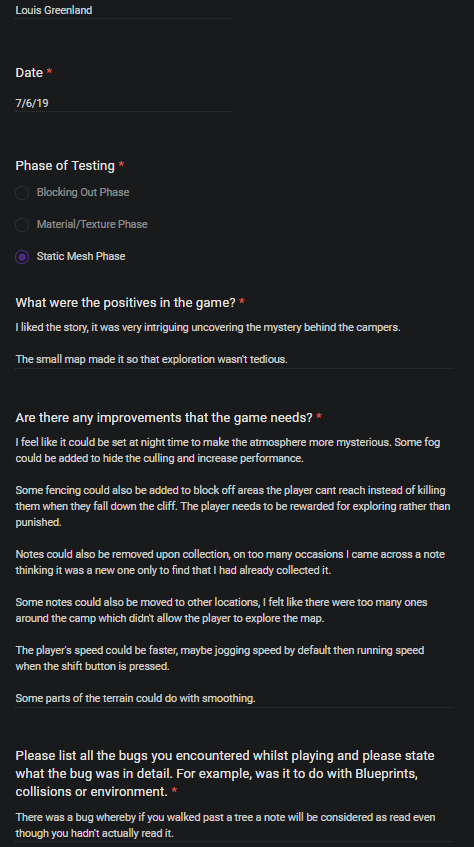
I really enjoy receiving feedback from different peers as it can really help me improve and push my game in the right direction. I agree with most of the improvements listed here. I went ahead and moved the notes to clearer locations, mainly next to focal points. I will take a look at different games and their walking speeds and try to match my game to their standards. Unfortunately, due to the lack of time, I would not be able to add code to my game as I should mainly focus on the written work that is needed.
BUG THAT IS NOT FIXABLE
Unfortunately, there is a current bug which allows the player to walk through a trigger, without pressing E, and once they leave, you get the point of reading the note. This can be really difficult for other players who care for story. They can easily just miss notes without seeing the Press E pop up. This is un-fixable due to the lack of time I have to code for the project any more.
REMOVING THE KILLING ZONE
From popular demand from my peers, they thought removing the killing floor was a good idea. I was told that removing the killing floor and adding normal blocking volumes where appropriate would award the player for exploring. Killing the player for exploring was more of a punishment. After listening to this advice with some reasoning, I have taken it upon myself to just add blocking volumes where necessary and remove the Killing Collide Volume.

MAKING THE NOTES EASY TO FIND
I have moved the notes in better locations as stated before. Making sure the player can actually see the notes and they are not too hard to find. I want the players to discover the story after all, not spending hours trying to find the notes. Although I can't fix the collision bug for the notes as stated earlier, I made the trigger boxes bigger so that they have more of a chance to realize that they need to read the note. This is a great solution to a serious problem in the game. I just now need to have someone play test this aspect of the game.
As of the current game state (10/06/19), the game does not have a main menu or a ending cutscene. I Intend to have this implemented before the final show which will be the 27/06/2019. So I still have time yet.
I have organised all my files to make sure I have all the phases of this project in full completion.
The files are:
SP_FMP_BlockingOut
SP_FMP_SM
SP_FMP_Textures
STATIC MESH PHASE HAS BEEN FINISHED AND FINALIZED.
FINISHED DATE - 10/06/2019
NUMBER OF BUGS:
BUILDING THE LIGHTING - BUG 1
ATTEMPTING TO MAKE STATIC MESHES INTO COLLISION SURFACES - BUG 2
PLAYER NOTE TRIGGERS - BUG 3
Comments